Thursday, January 14, 2010

WMWifiRouter v.1.61 build 1126


Device specific compatibility updates:
- HTC HD2
- Samsung Omnia II
- Samsung Omnia Pro B7320
- Samsung Omnia Pro B7330
- Samsung Omnia Pro / Qwerty B7610
- Samsung B7620 / Giorgio Armani II

Features:
* Share your cellular data/internet connection over wifi
* Connect any wifi-enabled device with ad-hoc mode support
* Supports multiple devices at the same time
* Easy to use: for most users, getting up and running is a matter of a single click
* Power saving: works even when the device is suspended!
* IP, wifi and cellular configuration built-in
* 64- and 128-bit WEP encryption support
* Automatic reconnect on connection loss
* Compatible with almost all recent Windows Mobile devices
* Distinction between basic and advanced users
* Keep-alive support to prevent automatic disconnects for specific carriers
* Battery monitoring and management
* Support for sharing your cellular data connection over bluetooth and usb
* Support for sharing your wifi connection to usb, and vice versa
* Multi-language support
# Ability to feed internet to your normal wireless router, with WPA encryption
# Live traffic statistics
# Live DHCP statistics
# Port mapping support
# DMZ support

WMWifiRouter 1.60
This new version brings a long list of changes. Excluding the minor changes, tweaks and bug-fixes, here are the main ones:
- Due to further optimizations the complete WMWifiRouter package is now about 35% smaller
- Various minor UI tweaks for better compatibility with Windows Mobile 6.5 and 6.5.x
- The setup procedure for new installs is now much shorter. Of course, all configuration options you may ever need are still available under Options -> Configuration
- Some informational pop-ups have been added
- When sharing over Wi-Fi, an informational window now pops up listing the network name and password

Thursday, January 7, 2010

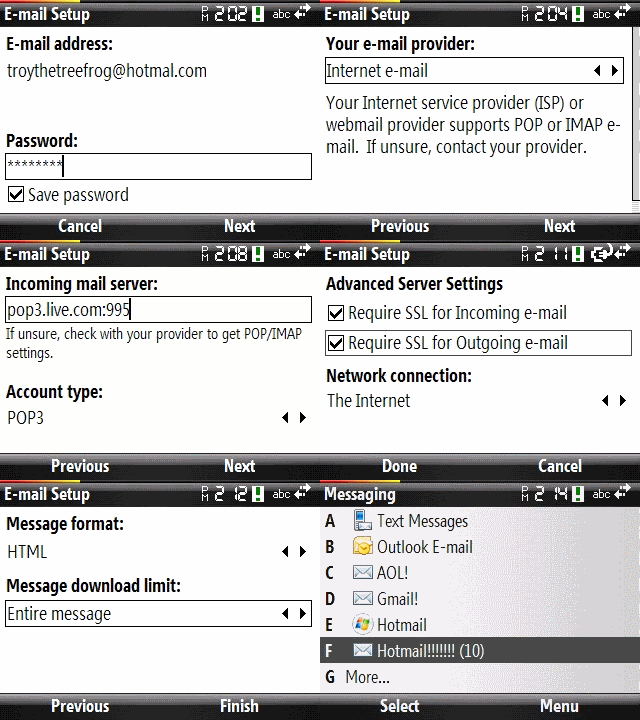
POP3 support for Live Mail and Hotmail


1) Under Email setup use a fake email address: myname@blah.com
2) Put in the password
3) Unselect "Try to get email settings automatically"
4) Proceed to fill out your name, and use the incoming, outgoing and other mail settings as indicated below. Note: use advanced settings to enable "Outgoing server requires authentication and Use the same user name..." also enabled "Require SSL for incoming and outgoing email"
5) When it's finished it should download all of your current Live or Hotmail messages.
6) Go back and edit the account settings and fix step 1 to use your real Hotmail or Windows Live email account.
You should now be able to send and receive hotmail without having to use Windows Live!!

POP server: pop3.live.com
POP SSL required? Yes
User name: Your Windows Live ID, for example yourname@hotmail.com
Password: The password you usually use to sign in to Hotmail or Windows Live
SMTP server: smtp.live.com
Authentication required? Yes (this matches your POP username and password)
TLS/SSL required? Yes

UC Browser 7.0


UC Browser is a professional mobile browser designed by UC Mobile Limited. It is offered totally free of charge for users. UC Browser enables you to access the Internet fast and exchange data at any time. Not only can you edit your blogs, surf around online forums and communities, send and receive e-mails, but also download online resources. All of which will bring the large colourful world into your pocket, and provide fantastic mobile life for you!

What's new in UC Browser 7.0
• Optimized layout to provide more comfortable visual effect.
• Fancier UI experience
• More scientific menu arrangement
• Considerate Help Contents to help you understand your UC Browser.
• Rotate your screen as you like
• Support Flash 6 play online (only available on Symbian v3&v5, PPC 2005)
• Send downloaded files and bookmarks by bluetooth(Symbian)
• New function Cursor Mode and Zoom Mode help revive the PC effect. (Java)
• Bookmarks Top and Bottom function (Java)
• Click Dial key to enter Quick Visit, set sites mostly visited here.(Symbian)

Wednesday, December 23, 2009

SMS Delivery Notify Fix for B7320

SMS Delivery Notify Option comes disable default but you can't enable even if u mark the option so you have to modify registry or install below cab file.

1. Copy SMSDeliveryNotify_Enable.cab file to your device
2. Install SMSDeliveryNotify_Enable.cab
3. Restart your device

Note: retry it with SMSDeliveryNotify_Disable.cab if you want to disable it.
Since the cab file modifies registry, you have to unlock your device in order to fix it.

1.SMSDeliveryNotify_fix.cab dosyasını cihaza kopyalayin.
2.SMSDeliveryNotify_fix.cab dosyasını kurun.
3.Cihazi tekrar baslatin

Not: SMSDeliveryNotify_Disable.cab ile iletim raporunu kapatabilirsiniz.
Cab dosyasi registry'ye mudahale ettigi icin cihazi onceden unlock yapmaniz gereklidir.

Thursday, December 17, 2009

VZO Mobile v1.3.2


Mobile and PC Video Calls;
Address Book and Text Chat;
Supports front and rear cameras;
Works through 3G, Wi-Fi, WiMax.

Changes:
-Chat stability and performance were improved;
-Landscape devices support improved;
-Flip screen function was added to rotate application screen between right and left handed orientations;
-Many bugfixes were fixed.